


Fully Automatic Bga Rework Station
1.HD Optical Alignment for mounting 2.Intelligent Control for desoldering and soldering 3.Stable Temperature Control 4.IR preheating area being covered by glass-shield
Description
Fully automatic BGA rework machine with optical alignment system and auto chip-feeding
Optical alignment, smart temperature controlling, automatic desoldering and soldering and one-key to rework,
which can help you make reworking procedures easier.

Product prameter
| Power supply | 110~220V +/-10% 50/60Hz bga machine |
| Rated power | 4900W ic reballing kit |
| Upper heater | 1200W |
| Lower heater | 1200W |
| Bottom IR | 2400W |
| PCB position | V-groove,PCB-platform with fixtures is movable at X-axis |
| Temperature control | PID and PPM caculating, thermocouple cloosed-loop |
| Mounting accuracy | 0.01mm |
| Min chip space | 0.1mm |
| Temperature accuracy | +/- 1 ℃ |
| Monitor screen | 15 inches |
| Touch screen | 7 inches |
| Motor motion | PLC control |
| PCB size | Min 10*10mm, Max 450*400mm |
| Chip size | 1*1~80*80mm bga station |
| Dimension | 600*700*850mm |
| Net weight | 70kg bga machine price |
Product illustration 
| Monitor screen | Chip and motherboard imaged on reballing station |
| Upper nozzle | To collect hot-air for heating |
| Feeding system | Automatically carry or recyle a chip bga rework station price |
| Optical CCD | Visbile aligning and mounting |
| IR preheating | Preheating area |
| Left IR switch | Turn on/off bga soldering station |
| Joystic | Zoon in/out smd machine automatic |
| Touchscreen | To set temperature and time bga reballing station |
| USB port | Upload software or download temperature profile |
| Micmeters | Fine-tune +/-15mm |
| Thermocouple | External temperatures tested |
| Start | Start to work repair hashboard |
| Emergency stop | Stop running |
| Up and down knob | Up and down |
| Right IR switch | Turn on/off quick smd machine |
| Lower nozzle | To collect hot-air for heating |
| Light | Lighting s9 hash board repair |
| Start of light | Turn on/off |
| Laser position | To locate fastly automatically bga rework machine |
| CCD brightness | Brightness adjusted |
| HR adj. | Hot-air flow adjusted |
| Angle rotating | Chip rotate |
Function description
Display screen

HD optical CCD alignment system which can let an operator easily operate an BGA rework machine,
as the mouting procedure is visible on the display screen.
Mounting and upper heating integrated

Laser indicates chip position, vaccum nozzles automatically pick up or replace for desoldering or soldering.
IR preheating area

Carbon fiber heating tube which heats quicktly, high efficiency and long life.
Anti-high-temperature glass-shield covering IR preheating area, which is even to
heat and prevents small components from droppping inside.
Touchscreen
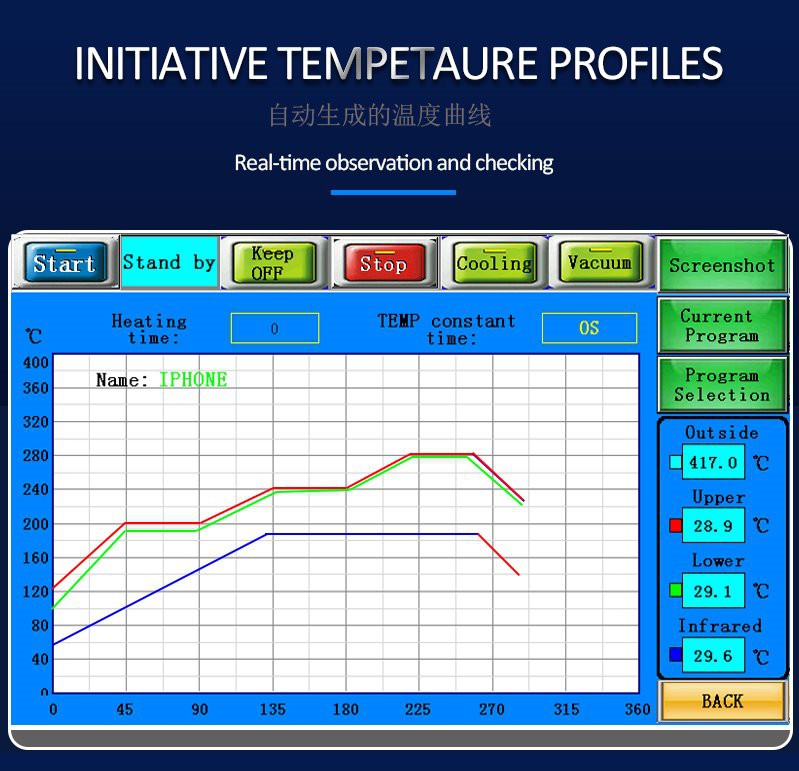
Automatically generating curves for temperatrue profiles, real-time showing their temperatures, high frequently
to probe running temperatures to make actual temperature to reach at temperatrues set.
Chips

For instance, TDFN,TSOP,PBGA,CPGA and SOT-233 and other kinds of chip which are not listed above.
The relevant knowledges of how to check one motherboard:
In daily life, it is not uncommon to encounter motherboard failures. The importance of the computer motherboard is well known, so when the computer motherboard is broken is
a very serious problem. What will happen if the computer motherboard is broken? How to repair the computer motherboard? Next, we will introduce the detailed computer mother
board repair methods:
Computer motherboard repair method?
Symptoms of a broken motherboard: freeze, blue screen
1. The most common motherboard fault is that the motherboard capacitor bursts. The fault is that the computer restarts from time to time, and the system runs unstable. Because it
is a power supply module, if there are too many capacitors, there may be no response to the boot or the fan to turn the display. show.
2. If the motherboard chip is damaged, it means that there is no response to the boot or all the fans are running, and the display has no response. In addition, if it can be turned on, it
does not necessarily mean that the hardware is all right.
Causes of motherboard damage
Human failure: plugging and unplugging I/O cards under power, and damage to interfaces, chips, etc. caused by improper force when installing boards and plugs. Bad environment:
static electricity often causes chips (especially CMOS chips) on the motherboard to be broken down. In addition, when the main board encounters a power failure or a spike gener-
ated by the grid voltage momentarily, it often damages the chip near the power supply plug of the system board. If the motherboard is covered with dust, it will also cause signal sh-
ort circuit and so on.
Common maintenance methods of motherboard
1. Observation method
First, check whether the motherboard has burn marks, whether the appearance is damaged, whether the plugs and sockets are skewed, whether the resistance and capacitor pins are
touching, whether the chip is cracked, whether the copper foil on the motherboard is blown, etc. The electrolytic capacitors on the motherboard are often damaged. It is easy to find
out through observation. Once a problem occurs, you can find a matching capacitor and replace it, and the problem can be solved.
2. Cleaning method
First, use a cleaning tool such as a brush to remove the dust on the motherboard to solve the short circuit fault caused by too much dust, and then use an eraser to wipe off the oxide
layer on the surface of the board to avoid the board from being oxidized.
3.Plug and swap method
This method can determine whether the fault is on the motherboard or the I/0 device. The specific operation is to exchange the same type of plug-in board or chip, and then judge the
fault according to the change of the fault phenomenon. Mainly used in easy-to-plug maintenance environment, such as memory self-check error, the same memory can be exchanged to
determine the cause of the failure.
4. Software diagnosis method
The software diagnosis method is a method of assisting the hardware maintenance of the motherboard through the accompanying diagnostic program or test software. This method is
suitable for checking various interface circuit faults and various circuit faults with address parameters.
If you check your motherboard as the procedures as above , but still not work, please use a fully automatically BGA rework machine for repairing soon.


