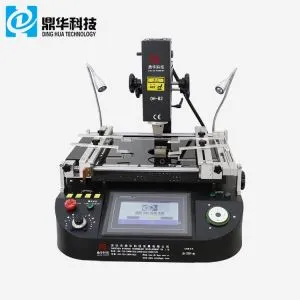
Optical Mobile Phone BGA Rework Station
1. Dinghua DH-G730 BGA rework station
2. Precise temperature control and high success rate of repairing
3. Highly precision optical alignment system
4. Both manual and automatic modes.
Description
1. Application
The motherboard of a computer, smartphone, laptop, MacBook logic board, digital camera, air conditioner, TV and
other electronic equipment from the medical industry, communication industry, automobile industry, etc.
Suitable for different kinds of chips: BGA, PGA, POP, BQFP, QFN, SOT223, PLCC, TQFP, TDFN, TSOP, PBGA, CPGA,
LED chip.
2. Product Features

• Widely used in Chip Level Repairing in mobile phones, small control boards or tiny motherboards, etc.
• Desoldering, mounting, and soldering automatically.
• HD CCD Optical Alignment system for precisely mounting BGA and Components
• Embedded industrial PC, Digital system setting, two independent heating zones, Panasonic CCD camera system,
HD touch screen conversational interface, PLC control, Multi-functional integrated control, Human structure design,
Folding optical lens, Optional number, store and choose the temperature profile.
• Two operation modes in the system: Auto/manual. Auto mode: auto soldering/desoldering BGA with a button. Manual
mode: Manual up/down top head to soldering/desoldering BGA with joysticks. Both modes combine with optical alignment
and laser positioning to finish the process. Meanwhile, a built-in vacuum can pick up BGA chips conveniently.
• Built-in vacuum in the mounting head picks up the BGA chip automatically after desoldering is completed.
3. Specification
| Power | 5300W |
| Top heater | hot air 1200W |
| Bottom neater | Hot air 1200W. Infrared 2700W |
| Power suoov | AC220V±10% 50/60Hz |
| Dimension | L530*W670*H790 mm |
| Posioning | V-groove CB support, and with an external universal fixture |
| emperaturecontol | K-type thermocouple, closed loop control, independent heating |
| Temperature accuracy | ±2℃ |
| PCB size | Max 450*490 mm. Min 22 *22 mm |
| Workbench fine-tuning | ±15mm forward/backward ±15mm right/left |
| Minimum chi spacino | 80*80-1*1mm |
| Temp Sensor | 1 (optional) |
4. Details of Optical Mobile Phone BGA Rework Station
- CCD camera( precise optical alignment system) ;
- HD digital display ;
- Micrometer (adjust the angle of a chip) ;
- Hot air heating;
- HD touchscreen interface, PLC control ;
- Led headlamp ;
- Joystick control.


5. Why Choose Our Optical Mobile Phone BGA Rework Station?

6. Certificate

7. Packing & Shipment


8. Contact us
Email: john@dh-kc.com
WhatsApp/Wechat:+86 157 6811 4827
9. Related Knowledge
Repairing Computer Motherboards and ICs
1,Essential Steps in Chip-Level Computer Repair:
Understanding circuit diagrams is crucial. You must be able to read these diagrams to comprehend the circuit's working principles, power-up sequences, and signal flow. If you can interpret the factory-provided PDF circuit diagrams, you may be able to repair motherboards or laptops you've never encountered before.
In actual maintenance work, you will often face unfamiliar motherboard models or those damaged by water or human error. In such cases, analyzing the factory's PDF diagrams is essential. As more people enter the field of computer maintenance, many factory circuit diagrams have become publicly available for learning and sharing.
2,Learning to Understand Factory PDF Circuit Diagrams:
To read and understand circuit diagrams, you must start by studying basic electronic components - such as resistors, capacitors, diodes, transistors, MOSFETs, and logic gates. Learn their identification, characteristics, working principles, and how they guide circuit behavior.
Additionally, understanding the circuit design differences among major manufacturers is important. You'll need to grasp protection circuit design, power-up timing, and signal flow. Once you master these skills, you'll be able to troubleshoot even upgraded or redesigned computers with ease.
Learning how to locate electronic components on a motherboard is also critical. If you can analyze the diagram but can't identify the components on the board, you won't be able to perform the repair - much like identifying a suspect without being able to locate them.
3,Circuit Design and Fault Diagnosis:
Each circuit on a computer motherboard is based on a set of working principles. Understanding these principles makes it easier to trace and analyze circuit paths. Those who don't understand them will often struggle, even after attending training.
Some technicians receive a motherboard and don't even know where to start. Identifying key test points on the board is essential to pinpointing faults. Just as traditional Chinese medicine practitioners use the pulse to diagnose illness, skilled repairers use voltage, resistance, and waveform readings at key test points to locate issues.
Many people spend 2–3 days repairing a laptop motherboard without finding the problem - not because it's unfixable, but because they don't know where to test.
4,Repair Tools and Their Importance:
Repair tools such as adjustable power supplies and oscilloscopes are essential for detecting faults. These tools are like a hospital's ultrasound or CT machine - they provide a clear view of internal issues.
However, to use these tools effectively, you must first understand the knowledge covered in sections 1, 2, and 3. Only with that foundation can you accurately diagnose faults using these instruments.