

How to calibrate a BGA hot air rework station?
Sep 07, 2026
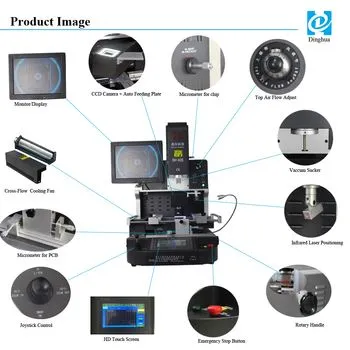
Calibrating a BGA (Ball Grid Array) hot air rework station is a crucial process that ensures the quality and reliability of BGA component soldering and rework. As a reputable BGA hot air rework station supplier, I understand the significance of accurate calibration in the electronics manufacturing and repair industry. In this blog post, I'll provide a comprehensive guide on how to calibrate a BGA hot air rework station effectively.

Understanding the Importance of Calibration
Before delving into the calibration process, it's essential to understand why calibration is necessary. A well - calibrated BGA hot air rework station provides consistent and accurate temperature control, airflow, and other critical parameters. This is vital for preventing issues such as cold joints, over - heating, and component damage during the soldering and rework processes. Inaccurate temperature or airflow can lead to poor solder quality, which may result in product failures, reduced reliability, and increased production costs in the long run.
Pre - Calibration Preparations
- Gather Necessary Tools:
- You will need a reliable temperature sensor, airflow meter, and a multimeter. The temperature sensor should have a high level of accuracy, typically within ±1°C to ensure precise temperature measurement. An airflow meter will help you determine the volume and velocity of the hot air, which is crucial for proper component heating. The multimeter is used to measure electrical parameters if your rework station has electrical components that need calibration.
- Read the Manual:
- Each BGA hot air rework station may have its own specific calibration procedures and requirements. Thoroughly read the user manual provided by the manufacturer. It will give you detailed instructions on accessing calibration settings, the expected calibration values, and any special procedures unique to your particular model.
- Inspect the Rework Station:
- Check for any visible damage, loose connections, or signs of wear and tear on the rework station. A damaged unit may give inaccurate calibration results. Ensure that all the nozzles are clean and free of debris, as clogged nozzles can affect airflow and temperature distribution.
Temperature Calibration
- Set Up the Temperature Sensor:
- Place the temperature sensor in the optimal position within the hot air nozzle. This position is usually specified in the rework station manual. In most cases, it should be placed at the center or a specific distance from the end of the nozzle to accurately measure the temperature of the hot air directed at the component.
- Power On the Rework Station:
- Turn on the BGA hot air rework station and allow it to reach a stable operating temperature. This may take several minutes depending on the model.
- Select the Calibration Mode:
- Navigate through the rework station's control panel to enter the temperature calibration mode. On some models, you may need to use a combination of buttons or menu options to access this mode.
- Compare Measured and Set Temperatures:
- Set the rework station to a specific temperature, for example, 200°C. Wait for the actual temperature measured by the sensors on the rework station and your external temperature sensor to stabilize. Compare the two values. If there is a significant difference, usually more than the specified tolerance (e.g., ±1°C), you will need to adjust the calibration settings.
- Adjust the Calibration:
- Use the calibration adjustment functions provided on the rework station to increase or decrease the temperature reading until the measured temperature by your external sensor matches the set temperature as closely as possible. You may need to make several small adjustments and re - check the temperature to achieve the desired accuracy.
Airflow Calibration
- Position the Airflow Meter:
- Insert the airflow meter into the hot air stream. Make sure it is properly aligned and placed at the appropriate location, usually near the end of the nozzle, to measure the airflow accurately.
- Set the Airflow Speed:
- On the rework station's control panel, set the airflow to a specific speed, such as 5 liters per minute (LPM). Wait for the airflow to stabilize.
- Compare Measured and Set Airflow:
- Read the airflow value displayed on the airflow meter and compare it with the set value on the rework station. If there is a discrepancy, you need to calibrate the airflow.
- Adjust the Airflow Calibration:
- Use the airflow calibration settings on the rework station to adjust the airflow speed. This may involve turning a potentiometer or using digital adjustment functions. Make small adjustments and re - measure the airflow until the measured value matches the set value within the acceptable tolerance.
Other Parameter Calibrations
- Power Calibration:
- If your BGA hot air rework station has adjustable power settings, use a multimeter to measure the actual power output. Compare it with the set power values on the control panel. Adjust the power calibration settings as needed to ensure accurate power delivery.
- Timer Calibration:
- Some rework stations have built - in timers for soldering and pre - heating processes. Check the timer accuracy using an external stopwatch. If there is a difference, adjust the timer calibration according to the manufacturer's instructions.
Post - Calibration Checks
- Repeat Measurements:
- After completing the calibration process, repeat the temperature, airflow, and other parameter measurements at different settings to ensure the calibration is consistent across the range of operation.
- Test Soldering:
- Perform a test soldering operation on a spare BGA component or a test board. Inspect the solder joints under a magnifying glass or using an X - ray inspection system if available. Look for signs of proper wetting, no cold joints, and no over - heating of the component.
Our Product Offerings
As a BGA hot air rework station supplier, we offer a wide range of high - quality products. For example, our Fully Automatic Soldering Robot System provides advanced automation and precision for soldering tasks. Our BGA Chips Reballing Machine is designed for efficient reballing of BGA chips. The Automatic BGA Rework Station For LED Repairing is tailored for LED - related rework, and the SMD Soldering Equipment Automatic Reballing Replace offers reliable automatic reballing solutions. Additionally, our Laptop Motherboard Automatic Repair Machine is perfect for laptop motherboard repair.
Contact Us for Purchase and Consultation
If you are interested in our BGA hot air rework stations or other related products, feel free to contact us for more information, product details, and pricing. We are ready to provide professional advice and support to meet your specific needs in the electronics manufacturing and repair industry. Whether you are a small - scale repair shop or a large - scale manufacturing facility, we have the right solutions for you.