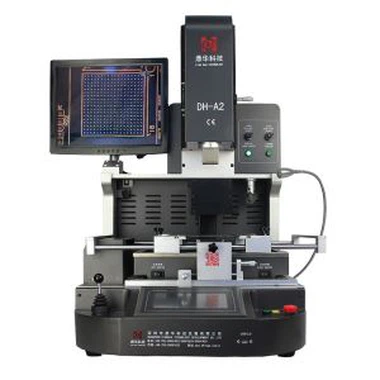
Laser Position CCD Camera BGA Reballing Machine
1. Matured SMD SMT solution provider.
2. Automatic heating and cooling system
3. No damage to the motherboard, chip, or other components.
4. Arranging shipment very fast.
Description
Laser position CCD Camera BGA Reballing Machine
A laser position CCD camera BGA reballing machine is a specialized piece of equipment used in
electronics manufacturing and repair. BGA stands for ball grid array, which is a type of package used
for integrated circuits.


1. Application Of Laser position CCD Camera BGA Reballing Machine
Can repair motherboards of computers, smartphones, laptops, MacBook logic boards, digital cameras,air conditioners, TV, and other
electronic equipment from the medical industry, communication industry, automobile industry, etc.
Solder, reball, and desoldering different kinds of chips: BGA, PGA, POP, BQFP, QFN, SOT223, PLCC, TQFP, TDFN, TSOP, PBGA, CPGA,
LED chip.
2. Product Features of Laser position CCD Camera BGA Reballing Machine

* Repairing chips (BGA, QFN LED) of motherboard/PCBA with a high success rate.
* Suitable for different chips, PCBA, and motherboards.
* 3 independent heating areas ensure precise temperature. Deviation with ± 1ºC. You can set different temperature profiles on the
screen based on different motherboards.
* 600 million pix Panasonic original CCD camera ensures precise alignment of every soldering joint.
* Easy to operate. Can learn to use it in 30 minutes. No special skill is needed.
3. Specification of Laser position CCD Camera BGA Reballing Machine

4. Details of Laser position CCD Camera BGA Reballing Machine


5. Why Choose Our Laser Position CCD Camera BGA Reballing Machine?


6. Certificate of Laser position CCD Camera BGA Reballing Machine
To offer quality products, SHENZHEN DINGHUA TECHNOLOGY DEVELOPMENT CO., LTD was the first to pass UL, E-MARK, CCC, FCC,
and CE ROHS certificates. Meanwhile, to improve and perfect the quality system, Dinghua has passed ISO, GMP, FCCA, and C-TPAT on-site audit
certifications.

7. Packing & Shipment of Laser position CCD Camera BGA Reballing Machine

8. Shipment for Laser position CCD Camera BGA Reballing Machine
We will ship the machine via DHL/TNT/FEDEX. If you want other shipping terms, please tell us. We will support you.
9. Terms of Payment
Bank transfer, Western Union, Credit Card.
Please tell us if you need other support.
10. Related Knowledge
Motherboard Maintenance
In terms of motherboard maintenance, I first recommend that you buy a genuine system for installation, which can improve the performance of the
motherboard and reduce the consumption of the motherboard. In addition, we must regularly handle the garbage of the computer disk and memory,
which can effectively reduce the work of the motherboard. Load, we also pay attention to computer dust cleaning, reduce the temperature of the m-
motherboard.
The failure of the motherboard also includes abnormal sounds, and the operation is malfunctioning. I will not list them here. When we choose the
computer, we come in and choose the official genuine model, so the quality of the motherboard can be guaranteed. Many of the faults mentioned above
are due to the poor quality of the motherboard. It is estimated that you have bought a reduced version and a refurbished machine. There will be a lot of
quality problems, everyone should pay attention.
We'd better buy a special computer desk, because computer desks generally design the computer's venting holes, which can well protect the computer's
heat dissipation, especially the cooling of the notebook computer, more important. Because laptops are small, heat is more important.
A computer that wants to use a long life, then we must pay attention to the usual protection of the computer. For the computer, whether it is the main board
protection is not to be damp, because the computer motherboard is powered, once the tide is affected, the motherboard will be affected, and the fault will
occur over time!
How to check if the motherboard has failed
In general, the failure of the motherboard is: no display on the screen, system startup failure, sometimes startup, and sometimes unable to start. This makes
it difficult to visually judge the fault. Today Xiaobian teaches you how to check the faults that appear on the motherboard!
First, clean:
This method solves the problem that the motherboard does not work properly due to too much dust on the motherboard and static electricity. Just
use a brush to clean the dust on the motherboard!
Second, observation:
Mainly use "see" and "touch". With the power off, check that each component is plugged in correctly. Whether the pins of the capacitor and the resistor are
in good contact, whether the surface of each component is scorched or cracked, and whether the copper foil on each circuit board has burnt marks. You can
also, touch the surface of some chips by hand to see if there is any hot condition.
Third, replace:
When you are not sure which component is causing the fault, you can also troubleshoot the suspected parts by replacing them. You can take the suspected
parts to another computer and try them out. At the same time, you can also try to connect the good parts to the faulty computer.